
Discord
Discord doesn't support theming by default. You need to modify the Discord client to apply a material theme. This guide is for pre-modified clients like Goofcord, Vesktop, Equibop.
STOP
Using a modified client violates Discord’s Terms of Service and may result in account suspension or a permanent ban. Proceed at your own risk — I am not responsible for any actions taken against your account. However, I yet to see anyone getting banned only for theming.
Install
Install a pre-modified clients or mod yourself. Here is a list of pre-modified client:
You can use any client mod that support loading custom CSS.
Link
Add the following lines to the configuration:
[links]
# ...
"midnight-discord.css" = [
    "~/.config/equibop/settings/quickCss.css",
    "~/.config/vesktop/settings/quickCss.css",
    "~/.config/goofcord/GoofCord/assets/material.css"
]
Thanks to refact0r/midnight-discord for creating the original theme, and InioX/matugen-themes for creating the original template.
INFO
You need to generate colors for these theme files to be created.
- If you're running
rongfor the first time:bashrong video -vv path/to/image/or/video - Else regenerate colors from current image:bash
rong regen -vv
Quick CSS
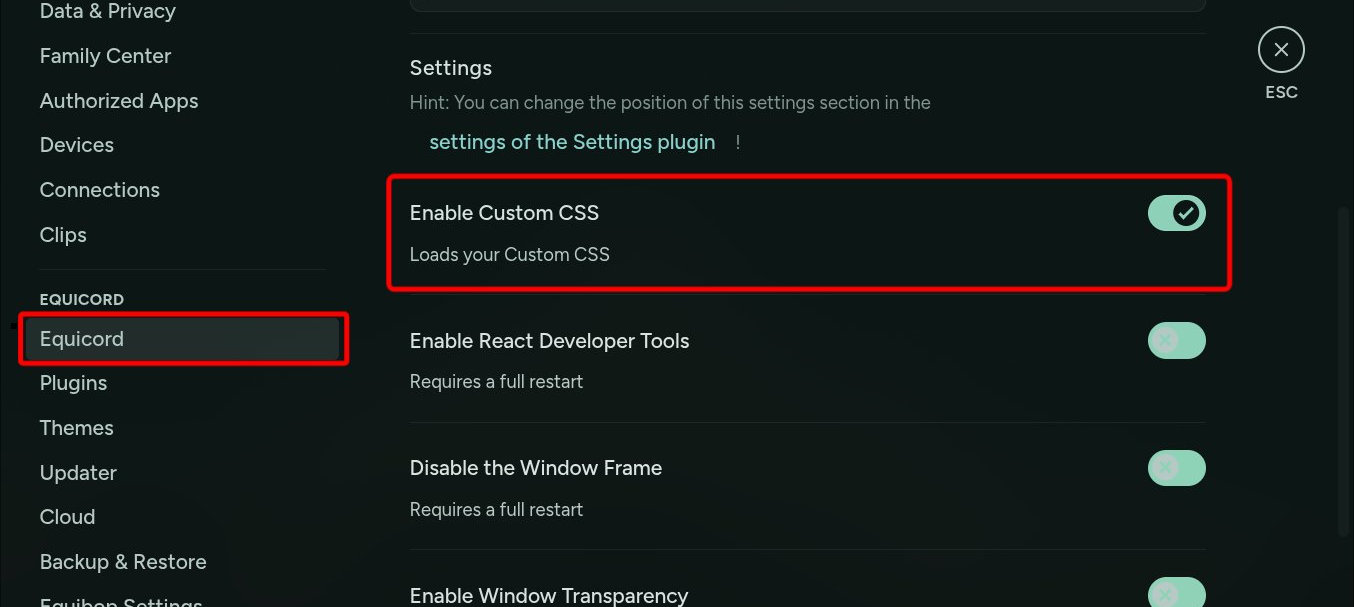
For Vesktop and Equibop, you need to enable quickCss. Go to User Settings > VENCORD/QUICORD and check Enable Custom CSS. The new theme will be automatically applied. If it doesn't, restart Discord.
Reload
All three of these clients support automatic live reloading without any action from the user.